Every once in a while, my Windows XP laptop decides to display this little jewel of interaction design:
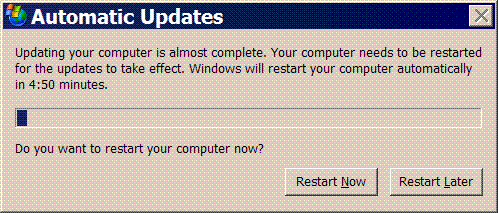
If you haven't seen it before, this dialog box basically means that Windows has downloaded a system update that needs to restart the system to install. Once it appears you have three choices:
- Do nothing - The system will wait for five minutes, filling in the progress bar, and then forcibly restart your computer.
- Click 'Restart Now' - Your computer will restart now.
- Click 'Restart Later' - The dialog box is dismissed and will reappear in 5-10 minutes.
In short, once this dialog box appears, you're screwed; Windows is so dead set on the immmense value of whatever unknown update it's downloaded that it's going to restart your computer and close every open application, document, and network-connection whether you like it or not. It doesn't matter if you're surfing the web or working on a cure for cancer: this dialog box bascially means that 1) whatever you're doing is less important than the system update and 2) you aren't able to decide for yourself any different.
To see why this is true, consider what the dialog box does not have:
- There is no way to see a list of what updates are being installed.
- There is no way to control how long the system restart is deferred.
- There is no way to launch the page of the system control panel that controls automatic update.
None of this stuff is rocket science. My guess is that no more than 2-3 person/weeks of developer time would be enough to put together a first rate and fully documented implementation of all three enhancements: The first already exists elsewhere and the second and third are both small bits of functionality. It's because of this I'm prepared to guess the reason features like these weren't implemented: a conscious decision was taken not to. Microsoft essentially decided that, for the class of users who didn't disable automatic updates from the control panel, they weren't willing to allow those users to make their own decisions about when patches are applied. For some reason it made more sense to preemptively restart users' computers. Is this kind of known invasive bad behavior really justified by the risk?